Getting Started with ChatGPT: A Beginner’s Guide to Using AI with Confidence
Welcome to the Future – One Conversation at a Time
Getting started with ChatGPT can feel like one of those moments when a new technology quietly changes the way people live and work. The internet was one of those moments. Smartphones were another. Artificial intelligence is the next.
If you’re new to ChatGPT, you may be wondering what all the excitement is about—or perhaps you’ve already tried it and aren’t quite sure how to get the results you expected. Either way, you’re in the right place.
This lesson isn’t about turning you into an AI expert overnight. It’s about helping you become comfortable enough with ChatGPT to actually use it. We’ll start with the basics, explore what ChatGPT can and cannot do, and then put it to work with practical examples you can try for yourself.
You don’t need to understand computer programming. You don’t need to know complicated AI terminology. And you certainly don’t need to have the “perfect” question ready before you begin.
Think of ChatGPT as a conversation. You provide information, ask questions, review the response, and continue from there. The more clearly you communicate what you need, the more useful that conversation can become.
By the end of this lesson, you won’t just be getting started with ChatGPT—you’ll have actually used it. And that experience is where confidence begins.
What You’ll Learn
By the end of this lesson, you’ll understand the basics of ChatGPT and, more importantly, know how to begin using it with confidence.
What ChatGPT is and what it can do
How to create and access your ChatGPT account
How to navigate the basic ChatGPT interface
How to start your first conversation
How to write clearer prompts that produce more useful responses
How to improve an answer by asking follow-up questions
What common beginner mistakes to avoid
How to practice what you’ve learned with a simple 15-minute exercis
Don’t worry about memorizing everything. This lesson is designed to be practical. You’ll learn by seeing examples, trying them yourself, and gradually becoming more comfortable with the way ChatGPT works.
What Is ChatGPT?
ChatGPT is an artificial intelligence assistant developed by OpenAI. You communicate with it using everyday language, much like you would communicate with another person through a text message.
You can ask ChatGPT a question, give it instructions, request an explanation, brainstorm ideas, analyze information, work with files and images, or ask for help completing a task. You can also continue the conversation with follow-up questions instead of starting over each time.
For example, suppose you want to learn about solar energy. You could begin with:
“Explain how solar panels work.”
If the answer feels too technical, you don’t have to abandon the conversation. Simply follow up with:
“Explain that again using everyday language and give me a simple example.”
Still want more help? Continue:
“Now explain the three most important things a homeowner should understand about solar panels.”
Notice what happened. You didn’t need to know special commands or technical terminology. You simply continued the conversation and told ChatGPT what you needed.
ChatGPT Is an Assistant, Not an Oracle
ChatGPT can be remarkably useful, but it’s important to understand that it can also make mistakes. A confident-sounding answer isn’t automatically a correct answer.
For everyday brainstorming, drafting, organizing, and learning, ChatGPT can be an excellent assistant. But when accuracy really matters—especially with medical, legal, financial, safety, or other high-stakes information—you should verify important claims using reliable sources or qualified professionals.
A useful habit to develop from the beginning is simple: use AI to assist your thinking, not replace it.
⭐ Stroxio Insight
You don’t have to learn how to “talk to a computer.” Talk naturally, provide useful details, and keep the conversation going.
Why ChatGPT Matters
The real value of ChatGPT isn’t simply that it can answer questions. It’s that it can help you move from an idea or a problem to a useful starting point much faster.
Think about an ordinary day. You may need to write an email, understand something unfamiliar, organize a project, plan dinner, prepare for a meeting, brainstorm an idea, or research a topic. These tasks are very different, yet ChatGPT can assist with all of them.
The important word is assist. ChatGPT works best when you bring your own goals, judgment, experience, and knowledge to the conversation. You decide what you’re trying to accomplish; AI helps you explore ways to accomplish it.
From a Blank Page to a Starting Point
Imagine you need to send a professional email asking your manager for a meeting, but you’re staring at a blank screen and aren’t sure how to begin.
Instead of spending ten minutes trying to write the perfect opening sentence, you could ask:
“Write a short, professional email asking my manager for a 20-minute meeting this week to discuss my current responsibilities and priorities. Keep the tone respectful and friendly.”
ChatGPT gives you a starting point. You can read the draft, change anything that doesn’t sound like you, and then ask for another version if necessary.
You might follow up with:
“Make it a little warmer and less formal.”
That second instruction is where an important lesson begins to emerge: you remain in control of the result.
One Tool, Many Uses
Learning: Ask for a difficult concept to be explained in simpler language.
Writing: Create a first draft of an email, letter, outline, or report.
Planning: Organize a trip, project, schedule, meal plan, or event.
Brainstorming: Generate ideas when you’re unsure where to begin.
Research: Explore a topic and identify questions worth investigating further.
Problem-solving: Break a complicated task into smaller, manageable steps.
You don’t have to use every capability ChatGPT offers. Start with one task that already matters to you. Once you experience how AI can help with something familiar, discovering other useful applications becomes much easier.
⭐ Stroxio Insight
The best first use of AI isn’t necessarily the most impressive one. It’s the one that makes something you already do a little easier.
Creating Your Account
You can start experimenting with ChatGPT without an account in supported regions. However, creating an account is worthwhile if you plan to use ChatGPT regularly because it allows you to save conversations and access additional account features.
Step 1: Go to ChatGPT
Open the official ChatGPT website in your browser. You can also use the official ChatGPT mobile app on iOS or Android.
Step 2: Create Your Account
Select the option to sign up and follow the instructions on the screen. Depending on the options presented to you, you may be able to create your account using an email address or a supported sign-in provider such as Google, Microsoft, or Apple.
Step 3: Remember How You Signed Up
This small detail can save you frustration later. If you create your account using Google, Microsoft, or Apple, remember which method you chose. Using a different sign-in method later can sometimes cause login problems or lead you into a different account.
Step 4: Complete Any Verification Requested
Depending on your account and device, ChatGPT may occasionally ask you to verify your identity—for example, with a code sent to your email or an approval request on your mobile device. Follow the instructions shown on the screen.
Step 5: You’re Ready
Once you’re inside ChatGPT, don’t worry about exploring every button or setting. For now, find the message box. That’s where your first conversation begins.
⭐ Stroxio Tip
Bookmark the official ChatGPT website after signing in. That gives you an easy way to return and helps you avoid accidentally using an imitation site.
Understanding the Interface
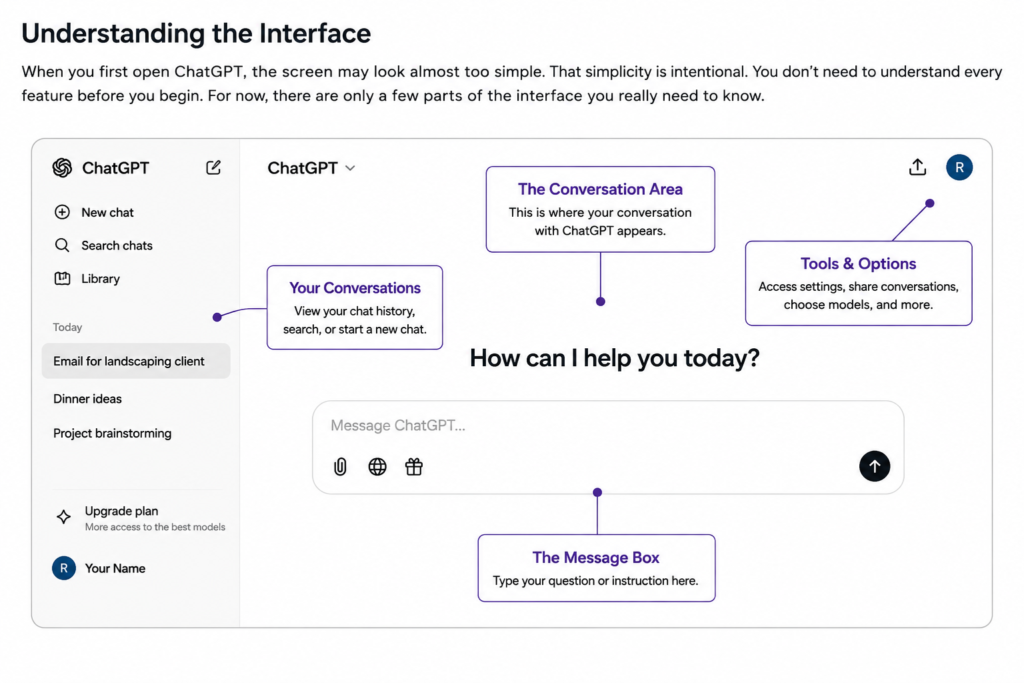
When you first open ChatGPT, the screen may look almost too simple. That simplicity is intentional. You don’t need to understand every feature before you begin. For now, there are only a few parts of the interface you really need to know.
The Message Box
The message box is where most conversations begin. Type your question, request, or instruction here and send it to ChatGPT.
Don’t worry about using special commands. You can write naturally, just as you would when explaining something to another person.
The Conversation Area
After you send a message, your conversation appears on the screen. ChatGPT’s response follows your request, and you can continue by asking another question or giving additional instructions.
You don’t have to repeat everything each time. Within the same conversation, ChatGPT can use the earlier discussion as context, which makes follow-up questions especially useful.
Starting a New Chat
When you want to discuss a completely different subject, you can start a new conversation. Keeping unrelated topics in separate chats can make your conversations easier to find and follow later.
Your Previous Conversations
When you’re signed in and chat history is available, you can return to earlier conversations instead of beginning again from scratch. This can be especially useful for ongoing projects, research, planning, or learning.
Tools and Additional Features
Depending on your account, device, plan, and the features currently available, you may see options for working with files, images, voice, web information, or other tools.
Don’t feel that you need to learn all of them today. We’ll explore these capabilities individually in later Stroxio lessons. For now, concentrate on becoming comfortable with ordinary conversations.
⭐ Stroxio Tip
When you’re learning new software, it’s tempting to click everything. Resist that temptation for the moment. Learn the one feature you’ll use most—the conversation itself—and add the others gradually.
Now that you know your way around the basic interface, you’re ready for the most important part of this lesson: having your first real conversation with ChatGPT.
Your First Conversation
This is where learning becomes doing.
If you’ve never used ChatGPT before, you may look at the empty message box and wonder, What am I supposed to type?
The answer is simple: start with something that matters to you.
You don’t need a special command, technical vocabulary, or a perfectly written prompt. Describe what you want in ordinary language and begin the conversation.
Start Simple
Suppose you’d like some ideas for dinner tonight. You could type:
“Give me five easy dinner ideas.”
That’s enough to start. ChatGPT will respond based on the information you’ve provided.
But now let’s make the conversation more useful. Follow up with:
“I have chicken, rice, broccoli, onions, and a few basic seasonings. I don’t want anything that takes longer than 30 minutes.”
Notice what you just did. You gave ChatGPT context. Instead of asking for random dinner ideas, you explained what ingredients you have, how much time you have, and what you want to accomplish.
Keep the Conversation Going
Suppose one of the suggestions sounds good, but you’re trying to reduce the amount of salt in your meals.
You could simply continue:
“I like the second idea. Can you make it lower in sodium and give me step-by-step cooking instructions?”
You didn’t start a new conversation. You didn’t repeat your original request. You simply added another piece of information.
This back-and-forth process is one of the most important habits you can develop when using ChatGPT.
From a Basic Prompt to a Better Prompt
Basic:
“Help me plan a vacation.”
Better:
“Help me plan a four-day vacation to Washington, D.C., for two adults in October. We enjoy history, museums, and good food. Our budget, excluding airfare, is about $1,500. Create a day-by-day itinerary and include some free activities.”
Neither prompt is technically wrong. But the second gives ChatGPT far more useful information: destination, length of stay, number of travelers, interests, budget, and the type of answer you want.
That’s the principle I want you to remember: you don’t need perfect wording—you need useful information.
⭐ Stroxio Insight
A good conversation with AI is rarely one brilliant question. It’s usually a series of ordinary questions that become more useful as you add context.
Don’t worry if your first response isn’t exactly what you wanted. Ask another question. Add a missing detail. Request an example. Tell ChatGPT what you’d like changed.
You’re not failing when you refine the answer. Refining the conversation is part of using AI well.
Writing Better Prompts
A prompt is simply the question, instruction, or information you give ChatGPT. It can be one sentence, several paragraphs, or even a combination of instructions and supporting material.
You don’t need to become a “prompt engineer” to get useful results. For most everyday tasks, a simple habit will take you surprisingly far: tell ChatGPT what you want, provide the information it needs, and explain what a useful answer should look like.
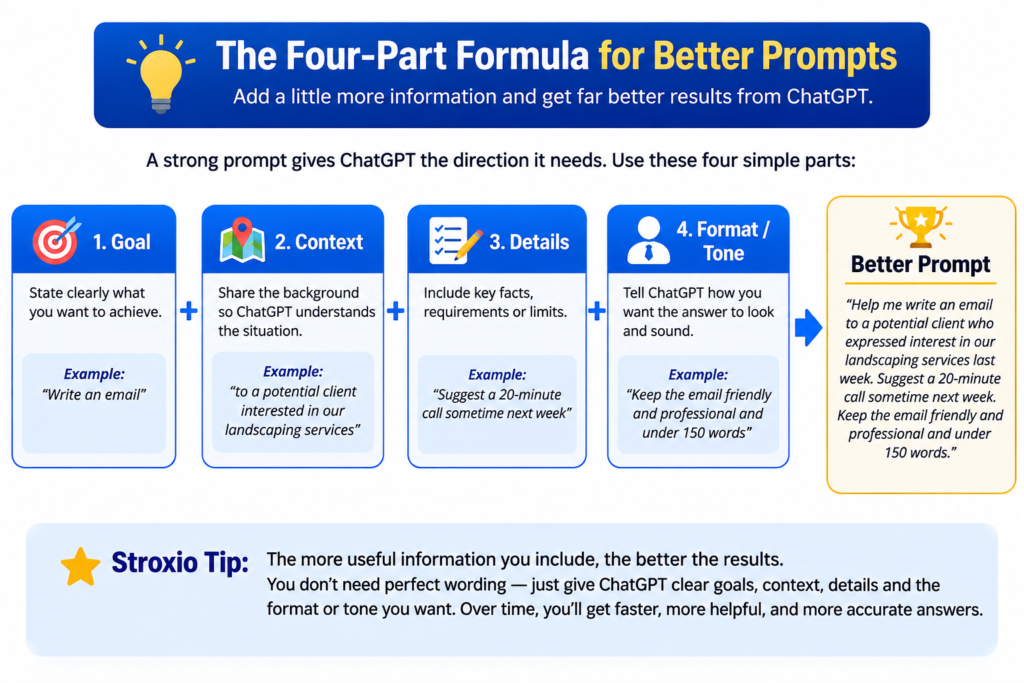
A Simple Four-Part Formula
When you aren’t sure how to structure a prompt, think about these four things:
1. Goal — What do you want accomplished?
“Help me write an email requesting a meeting.”
2. Context — What does ChatGPT need to know?
“I’m contacting a potential client who expressed interest in our landscaping services last week.”
3. Details — What requirements matter?
“I’d like to suggest a 20-minute call sometime next week.”
4. Format or Tone — How should the answer be presented?
“Keep the email friendly and professional and under 150 words.”
Put those pieces together and you get:
“Help me write an email to a potential client who expressed interest in our landscaping services last week. Suggest a 20-minute call sometime next week. Keep the email friendly and professional and under 150 words.”
That’s a much stronger prompt than simply saying:
“Write me a business email.”
You Don’t Always Need All Four
This formula is a guide, not a rule.
Sometimes a simple question is all you need:
“What causes a rainbow?”
Other times, the task requires more information. The trick is to notice when ChatGPT is missing something it needs and supply that information.
Tell ChatGPT Who the Answer Is For
One particularly useful technique is describing the audience.
Compare:
“Explain compound interest.”
with:
“Explain compound interest to a teenager who has never studied finance. Use a simple example involving $100.”
The subject hasn’t changed. The second prompt simply gives ChatGPT a clearer idea of how the explanation should be delivered.
Ask for the Format You Need
You can also specify how you’d like information organized.
Try instructions such as:
Give me a numbered checklist.”
“Put the comparison in a table.”
“Explain this in five bullet points.”
“Give me the short answer first, then explain it.”
“Walk me through this one step at a time.”
Formatting instructions can turn a good answer into one that’s much easier to use.
⭐ Stroxio Insight
Don’t spend ten minutes trying to create a perfect prompt. Start the conversation, look at the result, and improve it.
Good prompting is often less about writing one perfect instruction and more about knowing how to guide the next response.
You’ve now learned one of the most useful skills in working with AI: giving it enough direction to help you well.
Next, we’ll look at some common beginner mistakes—not to make you cautious about experimenting, but to help you recognize a few habits that can make ChatGPT less useful.
Common Beginner Mistakes
Learning ChatGPT is surprisingly forgiving. You won’t break anything by asking an awkward question, and there is no penalty for changing your mind halfway through a conversation.
Still, a few habits can make the experience more frustrating than it needs to be. Knowing about them now will help you avoid unnecessary confusion.
1. Being Too Vague
A prompt such as:
“Help me with my business.”
gives ChatGPT very little direction.
Try adding what kind of business you have and what you need:
“I own a small residential cleaning business. Give me five inexpensive ways to attract new customers in my local area.”
You haven’t made the prompt complicated. You’ve simply supplied the missing information.
2. Expecting the First Answer to Be Perfect
Your first response is a starting point, not necessarily the finished product.
If it’s too long, say:
“Shorten this.”
If it’s too complicated:
“Explain this in simpler language.”
If it doesn’t quite fit:
“That’s close, but make it more casual and give me another version.”
Follow-up instructions are a normal part of working with ChatGPT.
3. Assuming a Confident Answer Must Be Correct
ChatGPT can sometimes provide incorrect, incomplete, or outdated information while sounding completely confident.
That’s why important facts should be checked—particularly when the information could affect your health, finances, legal situation, safety, or another important decision.
AI can help you investigate a question. It shouldn’t eliminate your judgment.
4. Sharing Information That Should Stay Private
Treat your conversations thoughtfully. Avoid entering passwords, financial account numbers, private identification information, confidential business material, or other sensitive information unless you clearly understand how the service handles that information and have a legitimate reason to provide it.
A good general rule is simple: if you wouldn’t want the information exposed accidentally, think carefully before entering it into any online service.
5. Giving Up After a Poor Response
Sometimes ChatGPT simply misunderstands what you wanted.
That’s not the end of the conversation.
Try:
“That’s not quite what I meant. What I’m trying to accomplish is…”
and explain your goal again.
Learning how to redirect AI is itself an important skill.
⭐ Stroxio Insight
Making an imperfect prompt isn’t a mistake. Refusing to refine it is the missed opportunity.
Experimentation is part of learning. Every time you clarify a request, compare two responses, or try another approach, you’re becoming better at working with AI.
🎯 The Stroxio 15-Minute Challenge
You’ve learned a lot in this lesson, but reading about ChatGPT and actually using it are two different things.
So before moving on, set aside just 15 minutes.
Your goal isn’t to master ChatGPT. Your goal is to become a little more comfortable having a conversation with it.
Let’s put what you’ve learned into practice.
Challenge 1: Ask About Something You’re Curious About
Think of something you’ve always wanted to understand and ask ChatGPT about it.
It could be history, technology, gardening, money, cooking, science—or almost anything else that interests you.
For example:
“I’ve never really understood why we have seasons. Explain it to me in simple language.”
Read the answer. If something isn’t clear, don’t stop there.
Ask:
“Can you explain that part another way?”
Challenge 2: Solve a Real Problem
Now choose something you actually need to accomplish.
Maybe you need to:
Write an email
Organize your week
Plan a meal
Brainstorm a gift
Prepare questions for a meeting
Create a household checklist
Give ChatGPT enough information to understand your situation.
For example:
“I need five simple dinner ideas for two people this week. Each meal should take less than 30 minutes, use ordinary supermarket ingredients, and create minimal cleanup.”
Challenge 3: Improve the Answer
Choose one response ChatGPT gave you and improve it through follow-up questions.
Try:
“Make this simpler.”
Then:
“Give me three alternatives.”
Then:
“I prefer the second option. Walk me through it step by step.”
Pay attention to what happens as you provide more direction.
Take Two Minutes to Reflect
Before you finish, ask yourself:
What surprised me?
Which prompt gave me the most useful response?
What additional information improved the answer?
Did asking follow-up questions make the conversation better?
What could I use ChatGPT for tomorrow?
You don’t need to write down your answers unless you want to. The purpose is simply to notice what you learned from actually using the tool.
⭐ Stroxio Insight
Confidence with AI isn’t built by knowing everything before you begin. It’s built through small successful experiences.
Fifteen minutes may not sound like much, but if you finish this challenge, you’ve done something more valuable than simply reading about ChatGPT:
You’ve used it.
Key Takeaways
You’ve covered a lot in your first Stroxio lesson. You don’t need to remember every detail. If you remember these ideas, you’ve built a strong foundation:
ChatGPT is conversational. You can ask questions naturally and continue with follow-up instructions.
Context improves results. Tell ChatGPT what you’re trying to accomplish and provide the details that matter.
Your first prompt doesn’t need to be perfect. Start the conversation and refine the response.
You remain in control. Review, question, change, or reject what AI gives you.
ChatGPT can make mistakes. Verify important information rather than assuming every confident answer is correct.
Practice builds confidence. The more you experiment thoughtfully, the more naturally you’ll learn to work with AI.
Most importantly, remember that learning AI isn’t about memorizing commands. It’s about learning how to communicate your goals clearly, evaluate the results, and keep improving the conversation.
Want to understand more AI terminology? Explore our beginner-friendly guide, AI Terms Every Beginner Should Know, to learn the common words and concepts you’ll encounter as you continue learning about artificial intelligence.
🎓 Lesson Complete
Congratulations—you’ve completed AF-001: Getting Started with ChatGPT.
When you began this lesson, ChatGPT may have seemed unfamiliar or even a little intimidating. Now you know what it is, how conversations work, how to provide useful context, how to improve your prompts, and how to recognize some of its limitations.
More importantly, if you completed the 15-Minute Challenge, you’ve already started putting those skills into practice.
That’s progress.
You don’t need to master everything today. Keep experimenting, keep asking questions, and give yourself permission to learn one conversation at a time.
Continue Your Journey
You’ve learned how to begin using ChatGPT. Now let’s step back and understand the technology behind the bigger picture.
In AF-002, we’ll explain artificial intelligence in everyday language, look at examples you already encounter in daily life, and separate what AI actually is from some of the myths surrounding it.