
ChatGPT Is More Than a Question-and-Answer Tool
What is ChatGPT? At its simplest, ChatGPT is an AI assistant you can communicate with using everyday language. You can ask it a question, explain a problem, share an idea, or give it a task—and it will respond in a conversational way.
But ChatGPT is capable of much more than answering simple questions. It can help you understand unfamiliar topics, organize your thoughts, brainstorm ideas, summarize information, improve your writing, analyze files, and work through problems one step at a time.
That does not mean it knows everything or always gives the correct answer. ChatGPT has important limitations, and using it well requires knowing when to trust its help, when to check its response, and when human judgment matters more. In this lesson, you’ll learn what ChatGPT is, how it produces responses, where it is most useful, and what it cannot reliably do.
In This Lesson
By the end of this lesson, you’ll understand:
- What ChatGPT is and what makes it different from a search engine
- How ChatGPT creates its responses
- What ChatGPT does especially well
- Where its limitations can cause problems
- How to use ChatGPT responsibly and effectively
- When you should verify its answers or seek expert help
What Does “ChatGPT” Actually Mean?
The name ChatGPT offers a useful clue about what the tool is designed to do. It combines the word “chat” with the initials GPT, which stand for Generative Pre-trained Transformer.
- Chat means you interact with it through a conversation. You can ask follow-up questions, correct misunderstandings, or provide additional details without starting over.
- Generative means it produces new responses instead of simply retrieving a fixed answer from a database. It generates sentences based on your request and the context of the conversation.
- Pre-trained means the underlying AI model learned patterns from large amounts of information before it became available for people to use. This training helps it recognize language, relationships, writing styles, and common ways ideas are expressed.
- Transformer refers to the type of AI technology that helps the model understand relationships between words and generate a relevant response.
You do not need to understand the technical details of transformers to use ChatGPT effectively. The important point is that ChatGPT works with patterns in language. It predicts and produces a response that fits your prompt, but it does not think, feel, or understand the world exactly as a person does.
⭐ Stroxio Insight
ChatGPT’s responses can sound confident and polished, but confidence is not proof of accuracy. Think of every response as a helpful starting point—especially when the information involves important facts, decisions, or professional advice.
How Does ChatGPT Create an Answer?
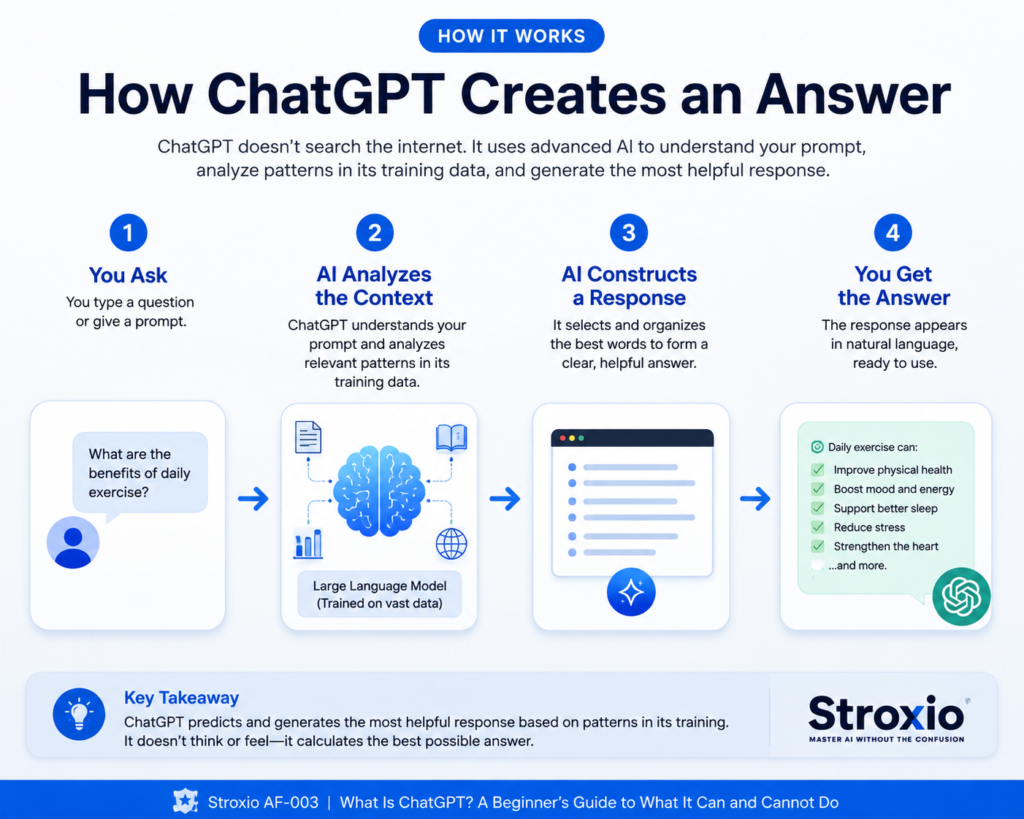
When you send ChatGPT a message, your words become the prompt. The prompt gives the AI a starting point and helps it determine what kind of response would be useful.
ChatGPT then examines the words, instructions, and context in the conversation. Using patterns learned during training, it predicts a suitable sequence of words and builds the response piece by piece. It does this very quickly, which can make the exchange feel like a conversation with another person.
However, ChatGPT is not automatically looking up every answer in a live database. In a standard conversation, it generates its response from learned patterns and the information you provide. When tools such as web search, file analysis, or connected services are available and used, it may also retrieve additional information to complete the task.
This distinction matters because a response can sound reasonable while still containing an outdated detail, a misunderstanding, or an invented fact. The clearer your prompt and the better the information you provide, the more useful the result is likely to be—but important claims should still be checked.
ChatGPT Is Not the Same as a Search Engine
A search engine and ChatGPT can both help you find information, but they work differently.
A traditional search engine responds to your query by finding web pages that may contain the answer. You receive a list of links and decide which sources to open, compare, and trust.
ChatGPT usually gives you a direct, conversational response shaped around your request. It can explain an idea in simpler language, reorganize information, create examples, and adjust its answer after you provide feedback. When web search is available and used, ChatGPT may also locate current sources and include links or citations.
Here is an easy way to remember the difference:
- Use a search engine when you want to locate websites, products, official pages, or current information yourself.
- Use ChatGPT when you want help understanding, organizing, comparing, creating, or working through information.
- Use both together when accuracy and current sources are important.
ChatGPT can save time by turning information into a useful explanation, but it should not replace checking reliable sources when the facts matter.
What ChatGPT Does Especially Well
ChatGPT is most helpful when you treat it as a flexible assistant rather than an all-knowing authority. Its strongest uses involve working with language, ideas, and information.
- Explaining unfamiliar topics: You can ask ChatGPT to simplify a difficult subject, define confusing terms, or explain something using an everyday example.
- Brainstorming ideas: It can suggest article topics, business names, project ideas, meal plans, interview questions, or different approaches to a problem.
- Drafting and improving writing: ChatGPT can help create outlines, emails, social posts, reports, or first drafts. It can also improve clarity, tone, grammar, and organization while preserving your main message.
- Summarizing information: When you provide notes, text, or a supported file, ChatGPT can identify the main points and turn lengthy material into a shorter explanation.
- Organizing plans and tasks: It can break a large goal into manageable steps, create checklists, compare options, and help you decide what to do next.
- Practicing and learning: You can use it as a study partner, ask it to quiz you, request examples, practice a conversation, or get feedback on your understanding.
The quality of the result depends heavily on the instructions and context you provide. A vague request may produce a general response, while a specific request usually gives ChatGPT a much clearer direction.
What ChatGPT Cannot Reliably Do
ChatGPT can be remarkably useful, but it has boundaries. Understanding them helps you avoid treating a helpful response as a guaranteed fact.
- It cannot guarantee that every answer is correct. ChatGPT may misunderstand a question, combine details incorrectly, or produce information that sounds believable but is false.
- It may not have the latest information. Unless current information is retrieved through web search or another connected source, a response may be outdated.
- It does not have human experience or judgment. ChatGPT can discuss emotions, relationships, and difficult decisions, but it does not experience life or understand consequences in the same way a person does.
- It cannot replace a qualified professional. Medical, legal, financial, and safety-related responses should be treated as general information, not as a diagnosis or professional decision.
- It cannot know missing context. If your instructions leave out an important detail, ChatGPT may make an assumption that leads the response in the wrong direction.
- It cannot safely protect information you choose to disclose. Avoid entering passwords, banking details, identification numbers, private medical records, or confidential business information unless you fully understand how the service handles that data.
The safest approach is to use ChatGPT for assistance while keeping responsibility for important decisions in human hands.
⭐ Stroxio Insight
The more serious the consequence of being wrong, the more carefully you should verify ChatGPT’s answer. A creative idea may need only your judgment, while health, legal, financial, or safety information should always be checked against a trusted source or qualified professional.
Why ChatGPT Sometimes Gives Incorrect Answers
ChatGPT is designed to produce a useful response, even when the information available to it is incomplete. Sometimes it fills the gap with details that sound convincing but are not true. This type of mistake is often called an AI hallucination.
A hallucination may be a wrong date, an invented quotation, a source that does not exist, an inaccurate explanation, or a confident answer based on a misunderstanding of your question. The response may be written so smoothly that the error is difficult to notice.
These mistakes happen because ChatGPT generates language by predicting what fits the conversation. It is not checking every sentence against a verified collection of facts before showing it to you.
You can reduce the risk by asking ChatGPT to identify its sources, explain its reasoning, state what it is uncertain about, or use web search when current information matters. You should still open important sources and confirm that they support the claims being made.
How to Get Better Results from ChatGPT
You do not need technical language or a complicated formula to use ChatGPT. However, a little context can make a major difference in the quality of the response.
When writing a prompt, try to include:
- Your goal: Clearly state what you want ChatGPT to help you accomplish.
- Useful context: Provide the background details that could change the answer.
- The intended audience: Mention who will read or use the result.
- Your preferred format: Ask for paragraphs, steps, a checklist, a table, or another useful structure.
- Important limits: Include a desired length, tone, deadline, budget, or anything that should be avoided.
For example, instead of writing:
“Help me write an email.”
You could write:
“Write a friendly but professional email to a customer whose order is two days late. Apologize, explain that the package is now on its way, and keep the message under 150 words.”
The second prompt gives ChatGPT a clear purpose, audience, tone, situation, and length. That makes it much easier for the AI to produce something you can actually use.
Remember that your first prompt does not need to be perfect. You can ask follow-up questions, request changes, add missing details, or tell ChatGPT what you liked and disliked about its response.You do not need technical language or a complicated formula to use ChatGPT. However, a little context can make a major difference in the quality of the response.
Using ChatGPT Responsibly
Responsible use begins with remembering that ChatGPT is a tool. It can support your thinking and improve your productivity, but you remain responsible for how its output is used.
Keep these habits in mind:
- Protect private information. Remove personal, financial, medical, customer, or workplace details that are not necessary for the task.
- Review before sharing. Read the complete response, correct mistakes, and make sure the final wording accurately reflects what you intend to say.
- Check important claims. Verify names, dates, statistics, quotations, instructions, and sources before relying on them.
- Watch for unfair assumptions. AI-generated responses can reflect incomplete information or bias. Pay attention to stereotypes, missing perspectives, and conclusions that seem one-sided.
- Follow applicable rules. Schools, employers, publishers, and professional organizations may have policies governing how AI-generated work can be used or disclosed.
- Keep your own judgment involved. ChatGPT should help you think—not prevent you from thinking. Question the response, compare alternatives, and make the final decision yourself.
Using ChatGPT responsibly does not mean avoiding it. It means combining the speed of AI with human judgment, accountability, and common sense.
⭐ Stroxio Insight
The best ChatGPT users do not simply accept the first response. They guide the conversation—adding context, questioning weak points, requesting revisions, and checking the details that matter.
Try It Yourself: Improve a Simple Prompt
Open a new ChatGPT conversation and begin with this simple prompt:
“Help me plan my week.”
Read the response, then provide more context with a second prompt:
“Help me plan my week from Monday through Friday. I work from 3:00 p.m. to 11:00 p.m., want to exercise three times, need two hours for household errands, and want one evening free. Present the plan as a simple daily schedule.”
Compare the two responses. Notice how the added schedule, priorities, time requirements, and requested format give ChatGPT a clearer job to perform.
Next, continue the conversation by asking:
“What conflicts or unrealistic assumptions do you see in this schedule?”
This final question encourages ChatGPT to review its own suggestion instead of simply producing another plan. You can use the same process with writing, research, learning, business ideas, or everyday decisions: begin with a goal, add relevant context, and then challenge the result.Open a new ChatGPT conversation and begin with this simple prompt:
“Help me plan my week.”
Read the response, then provide more context with a second prompt:
“Help me plan my week from Monday through Friday. I work from 3:00 p.m. to 11:00 p.m., want to exercise three times, need two hours for household errands, and want one evening free. Present the plan as a simple daily schedule.”
Compare the two responses. Notice how the added schedule, priorities, time requirements, and requested format give ChatGPT a clearer job to perform.
Next, continue the conversation by asking:
“What conflicts or unrealistic assumptions do you see in this schedule?”
This final question encourages ChatGPT to review its own suggestion instead of simply producing another plan. You can use the same process with writing, research, learning, business ideas, or everyday decisions: begin with a goal, add relevant context, and then challenge the result.
Common Questions About ChatGPT
These common questions help clarify what is ChatGPT, how it works, and what users should expect from it.
Is ChatGPT always correct?
No. ChatGPT can provide helpful explanations and well-written responses, but it can also make mistakes or invent details. Important information should be checked against reliable sources.
Can ChatGPT access the internet?
ChatGPT may be able to search the web when that capability is available and used. However, not every response automatically comes from a live internet search. If current information matters, ask it to search and provide sources, then open those sources yourself.
Does ChatGPT remember everything I tell it?
ChatGPT can use the messages within your current conversation as context. Additional memory features may also be available depending on your account and settings. You should still avoid sharing sensitive information and should never assume that a chat is the right place to store confidential records.
Can ChatGPT replace a search engine or a human expert?
No. ChatGPT can explain, organize, and help you work with information, but search engines are useful for finding original sources and current web pages. Qualified professionals are still necessary when specialized judgment, responsibility, or high-stakes advice is involved.
Do I need to be good with technology to use ChatGPT?
No. You can communicate with ChatGPT in ordinary language. Start by describing what you need as if you were speaking to a helpful assistant, then refine the response through follow-up questions.
What to Remember About ChatGPT
ChatGPT is an AI assistant that communicates through natural language. It can explain ideas, generate drafts, organize information, support learning, and help you work through tasks more efficiently. Understanding what is ChatGPT—and what it is not—makes it easier to use the tool effectively and responsibly.
Its greatest strength is flexibility. You can shape the response by providing context, requesting a particular format, asking follow-up questions, and giving feedback. However, that flexibility should never be confused with perfect knowledge. ChatGPT can misunderstand, make incorrect claims, overlook important context, or produce outdated information.
The most effective approach is to treat ChatGPT as a capable partner whose work still requires human review. Give it clear instructions, protect sensitive information, verify important facts, and keep responsibility for the final decision in your own hands.
Once you understand both its strengths and limitations, ChatGPT becomes much easier to use with confidence—and far less likely to mislead you
🎯 Stroxio Challenge: Put ChatGPT to the Test
Choose one real task you would like ChatGPT to help you complete. It could be writing an email, planning your week, learning a new topic, organizing an idea, or comparing several options.
Complete these four steps:
- Write an initial prompt in your own words.
- Review the response and identify one thing that could be clearer or more useful.
- Send a follow-up prompt that adds context or requests a specific improvement.
- Select one factual claim from the final response and verify it using a reliable source.
When you finish, ask yourself: Did ChatGPT improve because it became smarter, or because I gave it better direction?
The goal of this challenge is to practice using ChatGPT as an interactive assistant while keeping human judgment involved.
Key Takeaways
- ChatGPT is an AI assistant that communicates using natural language.
- It generates responses from patterns in language rather than simply retrieving fixed answers.
- ChatGPT is especially useful for explaining, brainstorming, drafting, summarizing, organizing, and learning.
- A clear prompt with useful context usually produces a better response.
- ChatGPT can make convincing mistakes, including invented facts and sources.
- Current or important information should be checked against reliable sources.
- Sensitive or confidential information should not be shared unnecessarily.
- ChatGPT works best when its speed and flexibility are combined with human judgment and responsibility.
Lesson Complete
Congratulations—you’ve completed AF-003: What Is ChatGPT?
You now understand what ChatGPT is, how it creates responses, where it performs well, and why its answers still require thoughtful review.
More importantly, you know how to approach ChatGPT with realistic expectations. You can give clearer instructions, improve results through follow-up questions, protect sensitive information, and verify important claims before using them.
That foundation will help you use ChatGPT with greater confidence, better judgment, and a clearer sense of responsibility.
Want to understand the AI terminology behind ChatGPT? Explore our beginner-friendly guide, AI Terms Every Beginner Should Know, for simple explanations and practical examples.
Continue Your Journey
Now that you understand what ChatGPT is—and where its strengths and limitations lie—the next step is to look beneath the surface.
Your next lesson is:
In AF-004: How AI Works, you’ll learn how AI systems use data, recognize patterns, and produce results without getting lost in technical jargon.
One lesson. One challenge. One step forward.